Robinhood Chain Explorer: Which One to Use and What Each Is Good For
Blockscout is the default. Arkham, Phalcon and HoodScan each solve a problem Blockscout does not.
The short answer
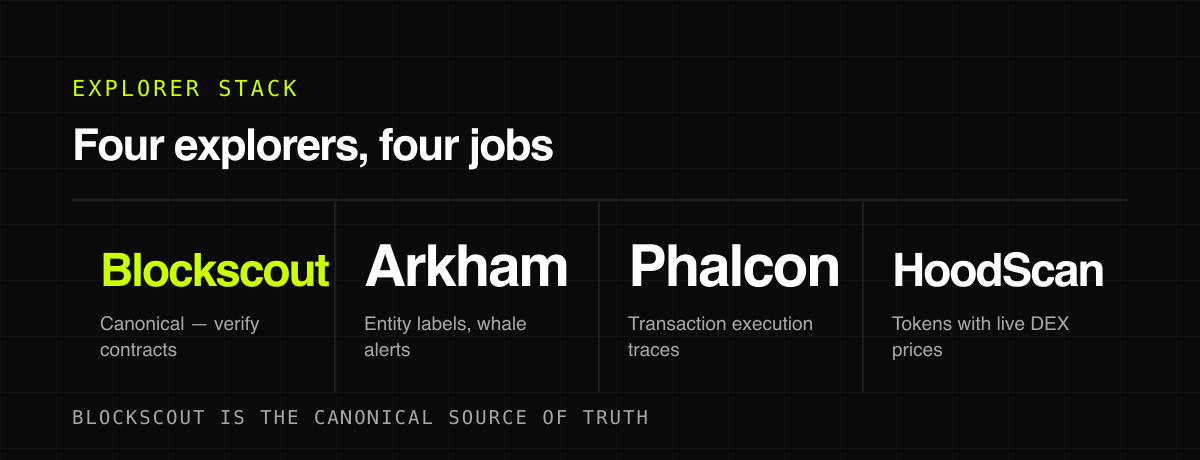
The canonical block explorer for Robinhood Chain is Blockscout at robinhoodchain.blockscout.com, which covers transactions, token transfers, contract verification and address history for chain ID 4663. Three third-party explorers add things Blockscout does not: Arkham labels addresses with real-world entities and alerts on large transfers, BlockSec's Phalcon decodes complex transactions with full execution context, and HoodScan layers live DEX pricing and token rankings on top of raw chain data. Start with Blockscout to verify a contract, then add the others when you need attribution or trade-level detail.
An explorer is the one tool you should open before you interact with anything on a new chain. On Robinhood Chain there are now four worth knowing, and they do not overlap as much as you would expect.
Blockscout – the canonical explorer
robinhoodchain.blockscout.com is the official block explorer for chain 4663. It indexes blocks, transactions, token transfers, addresses and verified contract source. If you only ever use one, use this one, because it is the reference other tools are checked against.
Two pages earn a bookmark. The tokens list surfaces every ERC-20, ERC-721 and ERC-1155 deployed on the chain, which is the earliest possible signal that a new collection or token exists. The stats page shows transactions, gas, active accounts and contract deployments over time – useful for sanity-checking whether the chain is actually busy or a particular app is generating all the noise.
Arkham – who is behind the address
 Arkham supports Robinhood Chain on its multi-chain explorer. The difference is attribution: it links on-chain addresses to labelled real-world entities, so a transfer stops being a hex string and starts being an exchange, a fund or a known trader. It also supports custom alerts on large transfers and a node-based Visualizer for tracing fund flows between addresses.
This is the tool you use when the question is 'who is selling into this' rather than 'did my transaction confirm'.
Phalcon by BlockSec – what the transaction actually did
Phalcon is an advanced explorer that breaks down complex transactions with full execution context. On a chain where a single swap can route a tokenized stock through an AMM pool, an oracle read and a lending position, the plain transaction view on a standard explorer tells you almost nothing. Phalcon shows the internal calls and state changes.
Reach for it when a transaction did something you did not expect, or when you are auditing an unfamiliar contract before committing size.
HoodScan – tokens with prices attached
 HoodScan indexes the same chain data but presents it trader-first: token rankings by trending activity, holder count, volume and price performance, with live DEX pricing pulled from
  GeckoTerminal and holder data from Blockscout indexing. It also runs a gas tracker and a top-accounts page.
It is not a replacement for Blockscout – it is a faster way to answer 'what is moving right now' without opening a separate screener.
Which one for which job
| Question | Explorer |
|---|---|
| Did my transaction go through? | Blockscout |
| Is this contract what it claims to be? | Blockscout (verified source) |
| Who owns this wallet and where did the funds come from? | Arkham |
| Why did this transaction behave strangely? | Phalcon |
| What tokens are moving right now? | HoodScan |
One more that does not fit the table: hoodexplorer.org maintains a curated directory of known contracts and accounts on the chain – protocols, tokens and infrastructure, browsable as a label cloud. It is closer to a reference index than an explorer, and it is genuinely useful for putting a name to a contract you keep seeing.
Reading a transaction properly
Most people open an explorer, see a green confirmed badge and close the tab. The confirmation only tells you the transaction executed – not that it did what you intended.
The fields worth reading are the token transfers list, which shows what actually moved and to whom, and the internal transactions, which show contract-to-contract calls the top-level view hides. On a swap, the token transfer list is where you confirm you received the amount you were quoted rather than a fraction of it after slippage.
For approvals specifically, check the value. An approval for an enormous number is an unlimited allowance, and it persists after the trade finishes. That single field explains most wallet drains.
Verifying a contract before you trust it
- Confirm the source code is verified. An unverified contract on a token asking for your money is a decision, not an oversight.
- Check the contract creation transaction and the deployer address – then look at what else that address deployed.
- Read the holder list. Concentration in the first few addresses tells you more than any marketing.
- Compare the token's contract address against the one linked from the project's own official channel, not from a reply.
Explorers as a research habit
The traders who lose least are not the ones with the fastest execution. They are the ones who open the explorer before they act rather than after. Thirty seconds spent confirming an address costs nothing when you are right and saves the position when you are not.
Bookmark the explorer, not the token page. Chains change, tools change, and the explorer is the one layer that keeps working when a front-end goes down.
Tools mentioned
 Blockscout Explorer
FAQ
What is the official Robinhood Chain block explorer?
Blockscout, at robinhoodchain.blockscout.com. It covers transactions, blocks, tokens, addresses and verified contract source for chain ID 4663. A separate Blockscout instance exists for the testnet.
Is there an Etherscan for Robinhood Chain?
Not as such. Blockscout fills the canonical explorer role that Etherscan plays on Ethereum, and it is open-source. Arkham, Phalcon and HoodScan provide the third-party layers.
How do I verify a token contract on Robinhood Chain?
Search the contract address on Blockscout, confirm the name, symbol and decimals match what you were told, and check that the source code is verified. Then run it through a token scanner before buying.
Can I see holder distribution?
Yes – Blockscout shows holder counts and the top holders per token. For visual clustering that exposes wallets controlled by one entity, use Bubblemaps on top.
More from the blog
Prediction Markets: A Price That Looks Like a Probability
A contract paying one dollar if something happens trades at the market's estimate of it happening. The gap between that and a forecast is where the money is.
Staking, and Why There Is None on This Chain
Staking pays you for securing a network. An L2 that settles to Ethereum and charges gas in ETH has nothing for you to secure.
Multisig: Removing the Single Point of Failure
Two of three signatures to move anything. It solves theft and loss at once, and introduces a problem of its own.