How to Use DEX Screener Without Fooling Yourself
The columns are easy to read and easy to misread. Here is what each one is measuring, and the three it cannot measure at all.
The short answer
DEX Screener lists every trading pair on a chain with its price, liquidity, volume and buy/sell counts, and its pair page adds the chart, the transaction feed and the contract address. Read liquidity before volume – volume without liquidity is a number produced by a handful of wallets trading with each other – and read the transaction feed before the chart, because it shows how many distinct addresses are behind the activity. It cannot tell you who holds the supply, whether the liquidity is locked, or whether the contract will let you sell. Those three questions need other tools, and they are the ones that cost money.
A screener is a list of every pair trading on a chain, refreshed continuously. It is the most-opened tab in onchain trading and the most confidently misread, because every column is a number and numbers invite comparison whether or not the comparison means anything.
What each column is actually measuring
| Column | What it means | What it does not mean |
|---|---|---|
| Liquidity | The value sitting in the pool, both sides | That it will still be there. It can be removed unless it is locked or burned |
| Volume | Value traded in the window | Interest. The same two wallets can produce it between them |
| Makers | Distinct addresses that traded | Distinct people. One person can hold many addresses |
| Txns | Buy and sell counts | Buy pressure. A thousand tiny buys can be one script |
| FDV | Price times total supply | What the token is worth. Most of that supply may never trade |
| Age | Time since the pair was created | Time since the project existed. Pairs get recreated |
Read them in the right order
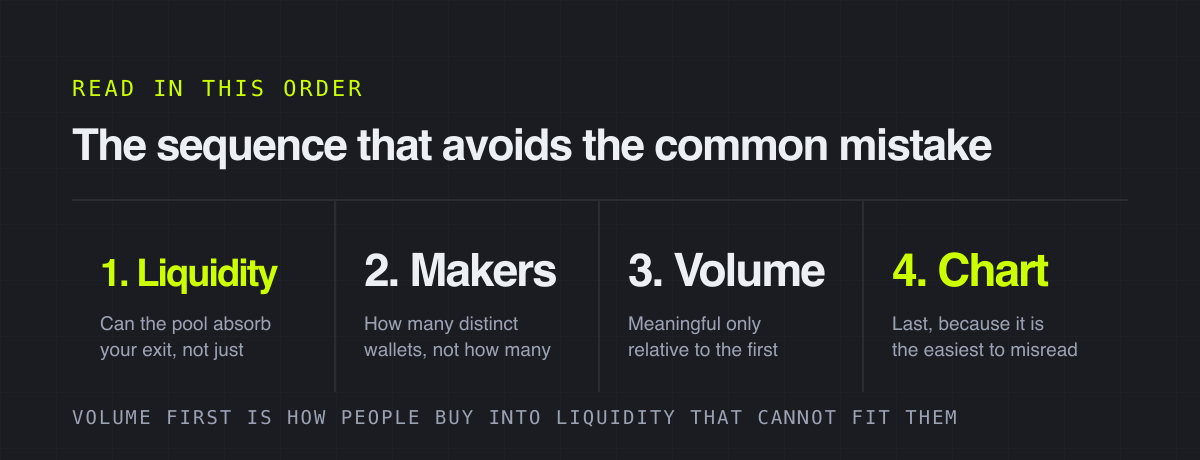
The instinct is to sort by volume or by percentage gained, which puts the noisiest pairs at the top of the screen. Start with liquidity instead, and ask a specific question: if I put this much in, can I take it back out. A pool with thirty thousand dollars of liquidity cannot return a five thousand dollar position at anything like the price on the screen.
Then look at makers relative to transactions. Four hundred transactions from twelve addresses is a different object from four hundred transactions from three hundred addresses, and the screener shows both numbers side by side.
The pair page is where the work happens
Clicking through gives you the chart, the live transaction feed and the contract address. The feed is the underrated half: watching thirty seconds of it tells you whether buys are arriving from many wallets or being manufactured, and whether sells are getting through at all.
The three things it cannot tell you
Who holds the supply
A screener shows trading, not ownership. Twenty wallets that look independent can be one entity, and the screener has no way to know. That question belongs to Bubblemaps, and it takes about a second to ask.
Whether the liquidity is locked
The liquidity column is a snapshot of what is in the pool right now. Whether the person who put it there can take it out again is a separate fact, readable on Blockscout, and not shown on any screener column.
Whether the contract will let you sell
A contract can accept buys and refuse sells, and the chart of such a token looks excellent right up to the moment you try to leave. Screeners have added safety indicators, and they catch the obvious cases, but the indicator is a heuristic and not a guarantee.
Paid placement is placement, not a signal
Trending slots and boosts are bought. They mean a project spent money on visibility, which is information of a kind, but it is not the kind that appears to be on offer. Treat a promoted pair exactly as you would treat the same pair found by scrolling.
A workflow that takes forty seconds
- Filter to the chain and set a minimum liquidity you would actually trade against.
- Sort by age rather than by gain if you are looking for new pairs, and by liquidity if you are not.
- Open the pair page and watch the transaction feed for half a minute.
- Copy the contract address and check holder clustering on Bubblemaps in a second tab.
- Check on the explorer whether the liquidity can be withdrawn.
- Only then look at the chart, which by now you have the context to read.
Tools mentioned
 Bubblemaps
 Blockscout Explorer
FAQ
Is DEX Screener free?
Yes. The screener, the pair pages, the charts and the filters cost nothing, and there is no account. What is paid is placement – trending slots and boosts are bought by projects, which is why they should be read as advertising rather than as ranking.
How do you find new tokens on DEX Screener?
Filter by chain, set a minimum liquidity, then sort by pair age rather than by percentage gained. Sorting by gain surfaces whatever moved most in the window, which on new pairs is usually the thinnest pool on the list.
Can DEX Screener tell you if a token is a scam?
Only partly. Its safety indicators catch common contract patterns, but it cannot see holder concentration, whether liquidity is withdrawable, or a contract designed to fail selectively. Those checks need a clustering tool and the block explorer.
More from the blog
Do You Pay Tax on Memecoin Trades? What Creates an Event
Not advice, and not jurisdiction-specific. A description of which onchain actions tax authorities generally treat as events, and what records you will need if yours does.
A Trading Journal for Onchain Trades: What to Record
The chain already logs every transaction you made. What it cannot log is why you made it, and that is the column the journal exists for.
Paper Trading Memecoins When No Paper Mode Exists
There is no demo account on a DEX. Here is how to practise anyway – and the one thing simulation can never teach you.